Builder Lab: making a game with blocks
Build a game by snapping blocks together — and watch the real code appear as you go.
Builder Lab lives in your account, in the browser. There’s nothing to install and nothing to set up. You drag blocks into place, and Builder Lab turns them into a real, working game.
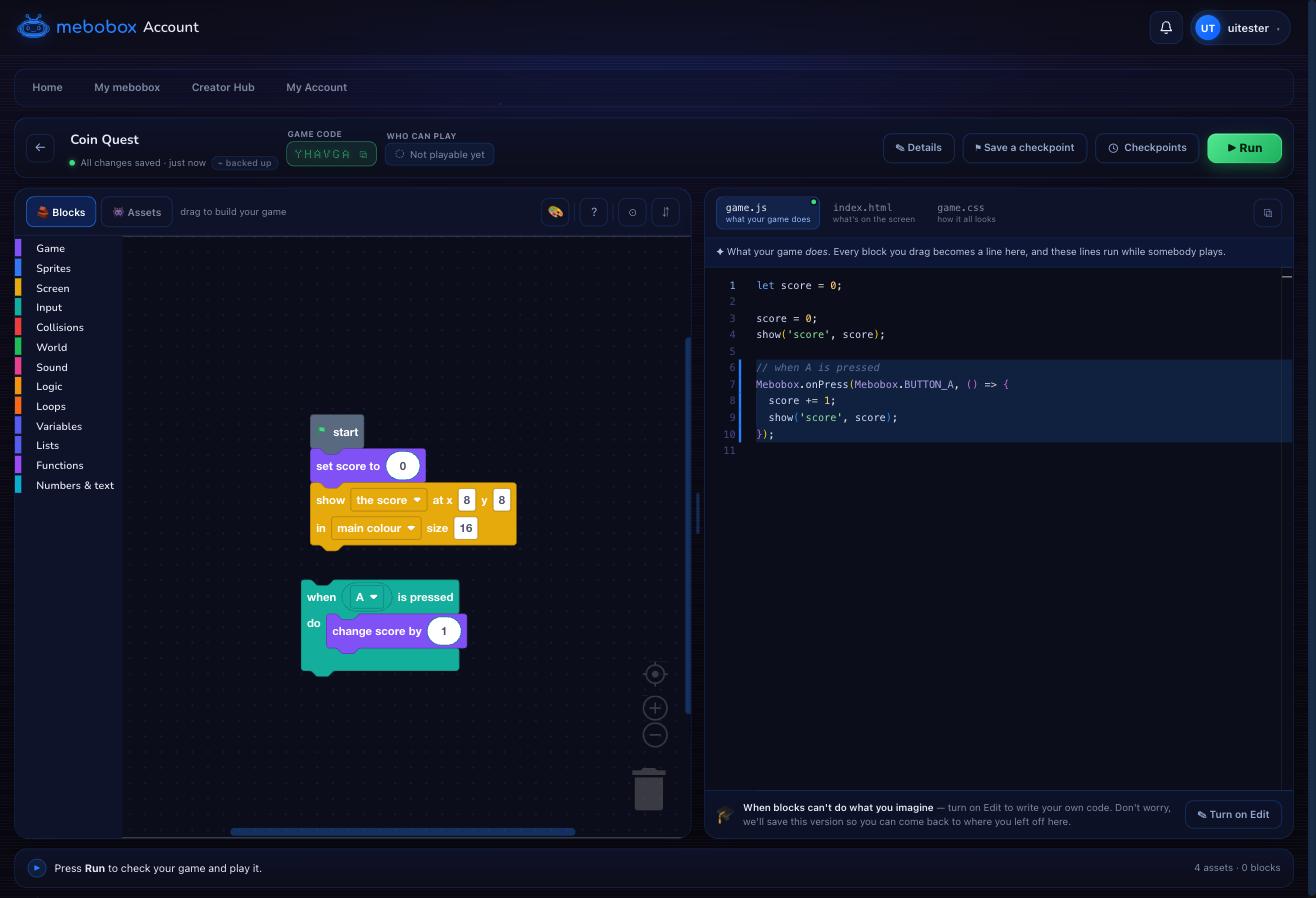 The blocks you drag (left) become real code (right). Every block is one line of your game.
Starting a game
- Sign in to your account and open Creator Hub → Build in Builder Lab.
- Let mebo build one with you, pick a template to learn from, or start from nothing.
- Give your game a name. It gets its own six-character code straight away — that’s what you’ll share, once it has passed a Run.
Stuck at any point? Ask mebo at the top of the editor. He’ll tell you what to change — more about mebo.
The blocks
Blocks are grouped by what they do, down the left:
- Game — the score, lives, and the “every frame” loop that runs your game.
- Sprites — the characters and objects in your game, and how they move.
- Drawing — painting the screen each frame: sprites, pictures, boxes, and the camera.
- Input — doing something when a button is pressed.
- Collisions — checking when two things touch.
- Screen — putting the score, a title, or a label on the screen and leaving it there.
- Sound, Logic, Loops, Variables, Lists, Numbers & text, Functions — everything else games are made of.
Every block that draws something — a sprite, a picture, a box, some words — ends with drawn normally / behind / in front. Everything “behind” is painted first, then everything “normally”, then everything “in front”. That’s how you make a player walk behind a doorway: put the door in front and leave the player normally. Backgrounds and the ground belong behind.
Every game starts from a single start block. Blocks you connect under it run once, at the beginning. A when A is pressed block runs whenever that button is pressed. The every frame block runs over and over, many times a second — that’s the heartbeat of most games.
Watching your game
The pane on the right opens on Your game — your game as it looks the moment it starts. It builds itself again a few seconds after you change something, so you can see what your blocks did without stopping what you’re doing.
It doesn’t listen to the keys while it’s sitting there. When you want to take the controls, click the game — or press ▶ Play — and it opens properly for you to play.
Seeing your code
Next to Your game, at the top of that same pane, are three more tabs — the real code your blocks make, split into three files:
- game.js — what your game does.
- index.html — what’s on the screen.
- game.css — how it all looks.
You don’t have to read the code to make a game. But it’s always a tap away, and clicking a block lights up the lines it made — a gentle way to see how blocks and code fit together, for whenever you’re curious.
Next
- mebo, your helper — starting a game off, and getting unstuck
- Adding pictures and sounds to your game
- Running and testing it
- Writing your own code when you’re ready for more